Key takeaways
- No stored credentials. GitHub proves who it is with a short-lived OIDC token. There is no client secret, certificate or PAT to leak or rotate.
- Two identities, not one. Plan runs read-only. Apply can write, but only to one resource group, and only after a person approves.
- Trust is exact. Azure accepts a token only if its subject matches a federated credential for that repo, branch or environment.
- Run on a real subscription. Plan, approval gate and apply, then a tag change and a VM resize through the same pipeline.
The problem with a pipeline secret
Most Terraform pipelines log in to Azure as a service principal and keep its client secret in a pipeline variable. That secret expires, gets copied around, and works from anywhere. If it leaks, so does your subscription.
OIDC federation removes the secret. Azure is told in advance to trust tokens that GitHub issues for one specific repo and context, and nothing else.
How it works
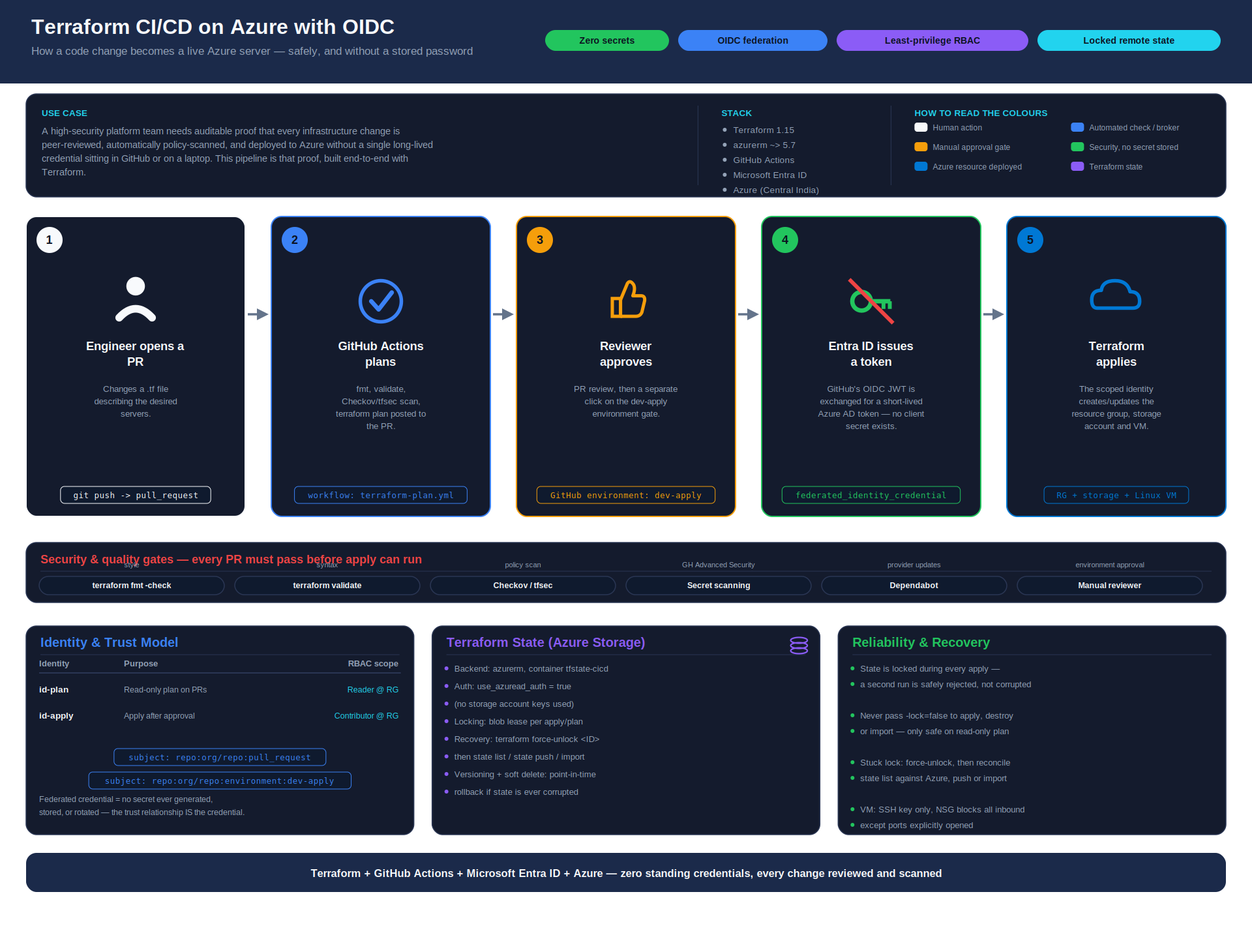
fmt and validate run on every pull request, Checkov reports without blocking, and the apply waits for a reviewer.- A workflow job asks GitHub for an ID token. The token names the repo and the context (pull request,
main, or an environment). - The job sends that token to Microsoft Entra ID. Entra matches it against a federated credential on a managed identity.
- If the subject matches exactly, Entra returns a short-lived Azure access token. If not, the login fails.
- Terraform uses that token for the plan or apply, and the token disappears when the job ends.
| Token subject | Identity | Rights |
|---|---|---|
| Pull request | id-tf-plan-github | Reader on the resource group, read-only on state |
Push to main | id-tf-plan-github | Same read-only identity builds the plan |
Environment dev-apply | id-tf-apply-github | Contributor on one resource group, plus write on the state container, after approval |
That is two identities and three federated credentials: the plan identity trusts two subjects, and the apply identity trusts one. The setup itself is Terraform too: a small bootstrap creates the identities, the credentials and the role assignments.
What gets built
The project is small on purpose, so every moving part is easy to see. It is built in this order:
- A state container. Remote Terraform state in Azure Storage, accessed with Entra ID instead of storage keys.
- A bootstrap module. Run once by an engineer. It creates the two managed identities, the three federated credentials (two on the plan identity, one on the apply identity) and the role assignments.
- A demo workload. A storage account, a virtual network, a deny-by-default network security group and a Linux VM with no public IP. It exists only to give the pipeline something real to plan and apply.
- Two workflows. One runs on every pull request:
terraform fmt -check,terraform validate, a Checkov scan, then a plan posted as a comment. The other plans on merge, waits for approval, then applies. - GitHub settings. A few repository variables and one environment with a required reviewer. None of them is a secret.
Only the bootstrap is ever run from a laptop. After that, every change to Azure goes through the pipeline.
Design choices that matter
Most of the security comes from a handful of decisions made up front, not from extra tooling.
| Decision | Why it matters |
|---|---|
| Separate plan and apply identities | A plan runs code from a pull request, so it only gets read access. The write identity is reachable only through the approval gate. |
| Exact subject matching | A token from another repo, another branch or another environment is rejected, even though it is signed by the same GitHub. |
| Roles scoped to one resource group | If the apply identity were ever misused, the damage stops at that resource group. |
| Apply the saved plan | What a reviewer approved is exactly what runs. Nothing is re-planned between approval and apply. |
| No lock bypass on apply | The read-only plan skips state locking because it never writes. Apply always locks, so two runs cannot corrupt the state. |
The workflow in one snippet
The pipeline denies everything by default and gives each job only what it needs. The id-token: write line is what lets a job ask for the OIDC token. This is an abridged extract from terraform-apply.yml:
permissions: {}                  # deny by default

env:
  ARM_USE_OIDC: "true"

jobs:
  plan:
    permissions:
      id-token: write            # allow this job to request an OIDC token
      contents: read
    env:
      ARM_CLIENT_ID: ${{ vars.AZURE_CLIENT_ID_PLAN }}    # read-only identity

  apply:
    needs: [plan]
    environment: dev-apply       # approval gate, and the token's subject
    env:
      ARM_CLIENT_ID: ${{ vars.AZURE_CLIENT_ID_APPLY }}   # write identity
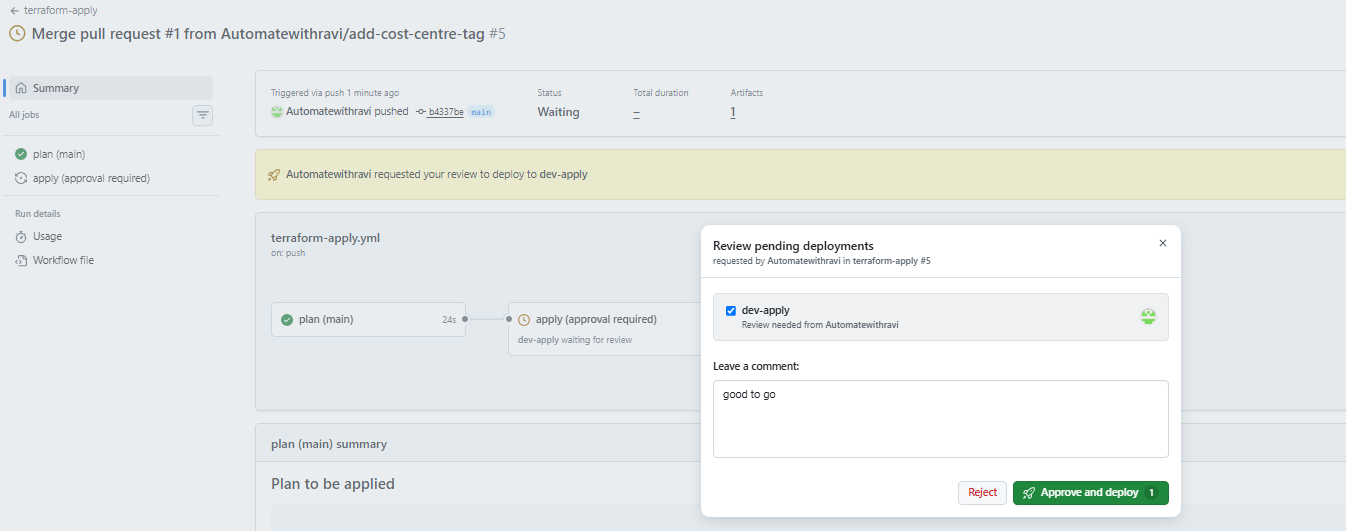
The apply job runs in a GitHub environment called dev-apply with a required reviewer. It applies the exact saved plan that was reviewed, not a fresh one.
The environment does two jobs at once. It pauses the run until a person approves, and it changes the token's subject to environment:dev-apply. Only that subject is trusted by the write identity, so a workflow that skips the gate cannot get a write token at all.
Proof it works
I ran it on a real subscription. The read-only identity planned a small demo workload (a storage account and a Linux VM with no public IP) as 8 to add, 0 to change, 0 to destroy, and the apply waited at the approval gate exactly as designed. After I approved it, the apply finished with 8 added.
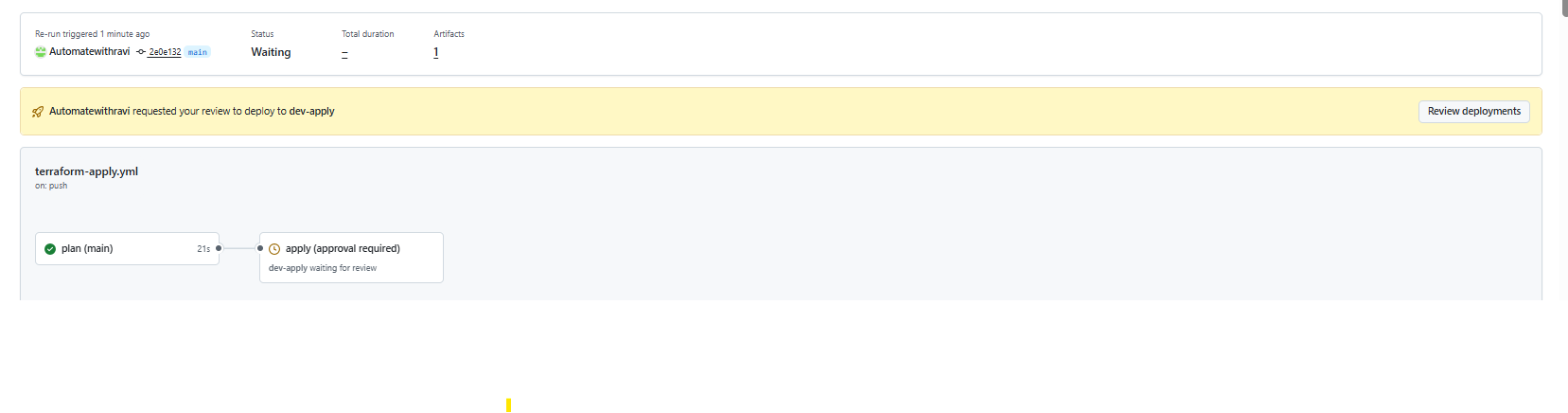
| Check | What it proves | Result |
|---|---|---|
| Login with no stored secret | The job authenticated through OIDC alone | Backend configured, plan ran |
| Plan with the read-only identity | Plan needs no write rights | 8 to add, 0 to destroy |
| Approval gate | Apply cannot start without a reviewer | Waiting for review |
| Apply after approval | The write identity works once the gate is passed | 8 added |
Then I pushed real changes through the same path. Adding a cost_centre tag came in as a pull request. After the merge the plan showed 5 to change, because a tag lands on every resource that carries it, and nothing happened in Azure until I approved. A VM resize followed the same route as a one-resource change.
What this does not solve
OIDC removes the pipeline's login secret. It does not make everything else safe.
- Secrets inside Terraform still reach state. If a resource needs a password, such as a Windows VM, it ends up in the state file. Keep the state account private and locked down with RBAC, or use Key Vault for the value.
- Reviews still matter. The approval gate only helps if the reviewer reads the plan. Treat "approve" as a real decision.
- Scans only report for now. Checkov runs on every pull request in report-only mode (
soft_fail: true), so a finding does not block anything until I switch that off. - Branch protection is the second lock. Require pull requests and passing checks into
main, so nobody can push straight to the branch that triggers the apply. On a private repository this needs a paid GitHub plan.
Cost
Managed identities are free, and GitHub Actions minutes are free on a public repository. The only real cost was the demo VM, and I deleted the resources once the evidence was captured, so the whole project cost pennies.
Explore the code
The full step-by-step guide has every file, PowerShell and bash commands, an Azure DevOps variant, a troubleshooting table and the checks I ran. Use it to rebuild this in your own subscription.
Read the build guide View the code on GitHub → ← Back to all blogs