Most "Terraform + Azure" portfolio projects stop at a resource group, a VNet, and an NSG. That proves you can write HCL — it doesn't prove you understand how an enterprise-inspired network foundation is actually put together. This series builds something closer to a real landing-zone network foundation: a hub network holding shared services, an isolated application spoke, and a workload VM with no directly attached public endpoint.
This build covers the network foundation only: hub and spoke VNets, peering, NSGs, remote Terraform state, and a Linux VM with no public IP. A full landing zone would go further — management groups, Azure Policy, identity, and centralised logging and governance are all out of scope here. Every claim below is backed by an actual test run against a live deployment, including the real errors hit along the way and one genuinely unexpected finding.
In this post
A hub-and-spoke network where the workload VM has no public IP — verified, not just configured
A deny-by-default NSG proven to actually block unauthorised traffic, with Azure's own diagnostics naming the rule
Six real bugs hit during the build, including a one-character typo and a subtle quoted-variable mistake that took real debugging to isolate
A genuinely unexpected finding: "no public IP" does not mean "no internet access" — and why that matters
Full test evidence: idempotency, scoped plan diffs, and a clean, cost-controlled teardown
Why this design, not just a flat VNet
In real organisations, shared services — monitoring, secure remote access, security tooling — live in one central network, the hub. Individual workloads live in their own isolated spoke networks. A spoke can reach the hub; spokes generally can't reach each other directly. This limits blast radius if one workload is compromised, and it's the same pattern Microsoft's own Cloud Adoption Framework recommends as a starting point for regional workloads.
Three deliberate security decisions carry the most weight in this build:
No public IP on the workload VM. The VM's network interface never references a public IP resource, so the VM has no directly addressable internet endpoint. Access through an intermediary service such as Bastion is still possible when explicitly deployed and authorised.
Azure Bastion as the only permitted interactive SSH path, and only when it's needed. Bastion is deployed behind a deploy_bastion feature flag, on for a testing session, off immediately after — a direct answer to the "keep cost controlled" requirement of a project like this. Worth stating precisely: this closes the interactive network path, not every route to the VM. Management-plane capabilities such as Azure Run Command still reach the machine through the Azure control plane, and are governed by Azure RBAC rather than by the NSG.
Deny-by-default NSG. One explicit allow rule (SSH from the Bastion subnet only), then an explicit deny-all beneath it. Anything else is evaluated against that explicit deny rule and rejected — NSG rules don't generate traffic logs on their own, so seeing why a packet was dropped means adding logging separately. VNet flow logs is the current path for that; NSG flow logs stopped accepting new resources in mid-2025 and retire fully in 2027.
Azure Firewall and a VPN Gateway are deliberately left out of this version — they add real monthly cost without being necessary to prove the network design itself.
Architecture
The diagram below isn't just a component map — it shows exactly which traffic is allowed, which is blocked, and which Terraform-managed rule is responsible for each decision. That distinction is the actual point of this design.
10.20.0.0/16 — workload subnet 10.20.1.0/24, private-endpoint subnet 10.20.2.0/24 (reserved, not yet in use)
Peering
Bidirectional, hub ↔ spoke, allow_forwarded_traffic = false, no gateway transit
NSG
Priority 100: allow SSH from the Bastion subnet only. Priority 4096: deny everything else inbound.
Workload VM
Ubuntu 22.04 LTS, no public IP, SSH key auth only
Region
Set through the var.location variable rather than hardcoded, so the same configuration deploys to any region. The region used for this POC was selected after checking the required SKU and service availability at deployment time — Azure pricing varies by service, currency and agreement, and no single region offers every Azure service.
State backend
Azure Storage, native blob-lease locking. dev has its own state key today; a prod key follows the same pattern once that environment exists.
How inbound access is constrained and verified
The diagram makes a claim most "secure network" write-ups only assert in prose: there is exactly one allowed inbound network path — SSH from the Bastion subnet, matched by NSG priority 100 — and every other attempt from another source is caught by the explicit deny-all at priority 4096. Two things make that verifiable rather than aspirational:
The VM has no direct internet endpoint. Its NIC never references a public IP resource. An internet-originated client therefore cannot address the VM directly; access is mediated through Bastion when that optional service is deployed.
Every other inbound attempt is a policy decision, not an accident. Test 3 proved this by checking the NSG's own rule evaluation directly — the traffic is denied by the explicit deny rule, by name, not merely reported as unreachable.
Logging is a separate control: this build verifies NSG evaluation with Network Watcher, but it does not deploy persistent traffic or Bastion session logging. In production, enable VNet flow logs and route Bastion audit logs through diagnostic settings to a central Log Analytics workspace or storage account.
Peering deliberately does not widen this. allow_forwarded_traffic = false and no gateway transit mean the hub-spoke link carries only direct traffic between the two VNets — it isn't a transit path to anywhere else, which matters once a real hub eventually holds a firewall or VPN gateway of its own.
Why two subnets in the spoke, not one
Splitting snet-workload and snet-pe is a design choice rather than a platform requirement — private endpoints can technically share a subnet with other resources. The separation is worth making anyway: it keeps subnet-level settings, route behaviour and address planning for private endpoints independent of the subnet holding actual compute, so a storage account private endpoint can be added later without re-architecting the network underneath it.
One point worth correcting, because it is repeated often: private endpoints no longer have to sit in a subnet with network policies permanently switched off. Network policies are disabled by default on a subnet, but they can be enabled for network security groups, for user-defined routes, or for both — which is exactly what you need if private endpoint traffic has to be forced through a firewall or NVA. See Manage network policies for private endpoints. This build leaves snet-pe empty for now, so the decision is deferred until Part 2 actually places an endpoint in it.
Terraform engineering
The repo is organised into reusable modules rather than one flat file, specifically so the same network code can be called for additional environments — a prod caller with its own terraform.tfvars — without duplicating any module logic. Only dev is built out so far; environments/prod/ doesn't exist yet, but adding it means writing a new caller directory, not touching the modules themselves.
Every module follows the same internal structure: variables.tf declares its inputs, main.tf uses them, outputs.tf exposes whatever downstream modules or the root config need. A module never inherits variables from its caller — each is a fully isolated scope, which is exactly what makes it reusable.
Key engineering decisions:
Remote state, bootstrapped once. Terraform state can't live in the storage account it's meant to create — a one-time, local-state bootstrap config creates that account first, and is never touched again.
Native state locking. The azurerm backend locks state via a native blob lease — no separate locking resource needed, unlike AWS's S3+DynamoDB pairing.
Explicit provider constraint.azurerm ~> 5.1 permits >= 5.1, < 6.0. For stronger reproducibility, use the tested minor constraint and commit .terraform.lock.hcl so the exact selected provider build is reviewed and repeatable.
Input validation, as designed. A validation block on the hub CIDR variable is meant to fail fast with a clear message instead of letting Azure reject a malformed address range deep into an apply — that only holds if the variable is actually threaded through to the module consuming it, which is worth double-checking rather than assuming.
Cost-gated optional resources.count = var.deploy_bastion ? 1 : 0 on every Bastion-related resource.
This post covers the decisions and the results. The exact, file-by-file build steps — every variables.tf, every command, in order — live in the repo's build guide, if you want to replicate this yourself.
POC scope versus production
This deployment proves the network pattern and Terraform workflow; it is not presented as a complete production landing zone. A production implementation would add the controls below.
This POC
Production addition
Direct hub-to-spoke peering
Central Azure Firewall or NVA, UDRs and controlled egress
Feature-flagged Bastion
Centralised Bastion, RBAC and diagnostic logs
NSG rules and point-in-time tests
Azure Policy, VNet flow logs, Defender for Cloud and central monitoring
One workload VM
Availability, backup, patching and lifecycle controls
Remote Terraform state
Entra ID authentication, restricted storage access and recovery controls
Local Terraform execution
CI checks for formatting, validation, linting, security scanning and reviewed plans
Real errors hit along the way
None of this went in cleanly on the first try — and the debugging process is worth documenting honestly, since it's a more useful signal of understanding than a build that "just worked."
1. Provider name typo
Could not retrieve the list of available versions for provider hashicorp/randon — a single-letter typo (randon instead of random) in required_providers. Terraform matches provider names literally, so this produced a registry lookup failure rather than an obvious spelling complaint.
2. A real azurerm v4→v5 breaking change
azurerm_storage_container switched from a storage_account_name argument to storage_account_id in the v5 provider line. Several other storage sub-resources (azurerm_storage_blob, azurerm_storage_share, azurerm_storage_queue) made the same change — worth knowing before any future storage account work on this provider version.
3. Duplicate provider configuration
A copy-paste slip left an unaliased provider "azurerm" {} configuration in both versions.tf and providers.tf. Terraform merges all .tf files in a module, so moving duplicate default configurations into separate files does not isolate them. Keep one unaliased default configuration; additional configurations must use provider aliases.
4. A quoted variable reference — the trickiest one
location = "var.location" instead of location = var.location inside the resource-group module. Quoting a variable reference turns it into literal text instead of evaluating the variable — Azure received "var.location" as the region name and rejected it as an invalid location. This took several rounds of file-by-file elimination to isolate because the bug was one level removed from where the error surfaced.
5. Network Watcher extension not installed
During this deployment, az network watcher test-connectivity did not complete until the NetworkWatcherAgentLinux VM extension was installed on the source VM. Network Watcher requirements vary by feature and the CLI command is still marked Preview, so document the Azure CLI version and test method rather than treating this as a universal prerequisite for every Network Watcher operation.
6. The genuinely interesting finding: default outbound access
The VM has no public IP, but it still had outbound internet access. A curl ifconfig.me from inside the VM via Bastion returned a public egress IP. The important Terraform-specific detail is that azurerm_subnet.default_outbound_access_enabled currently defaults to true unless it is explicitly disabled. That explains why this provider-managed subnet received default outbound access even though newer Azure API versions default new VNets to private subnets.
For a private workload subnet, set default_outbound_access_enabled = false before deployment. If controlled outbound access is required, a NAT Gateway provides predictable SNAT but does not filter destinations. To restrict egress, route 0.0.0.0/0 through Azure Firewall or an NVA and apply explicit network or application rules.
Test evidence
Every claim below was captured from a live rg-landingzone-dev deployment — not a description of expected behaviour.
What's covered: the six numbered tests below, plus a cost-control check, are the ones carrying a security or correctness claim, each backed by its own captured output. Additional deployment-time checks — provider authentication, state locking, and the initial apply — are documented step by step in the repository's build guide.
Test 1 — VM has no public IP PASS
az vm list-ip-addresses -g rg-landingzone-dev -n vm-app01-dev -o table
Only a private IP (10.20.1.4) is returned — no public IP address exists on the VM at all.
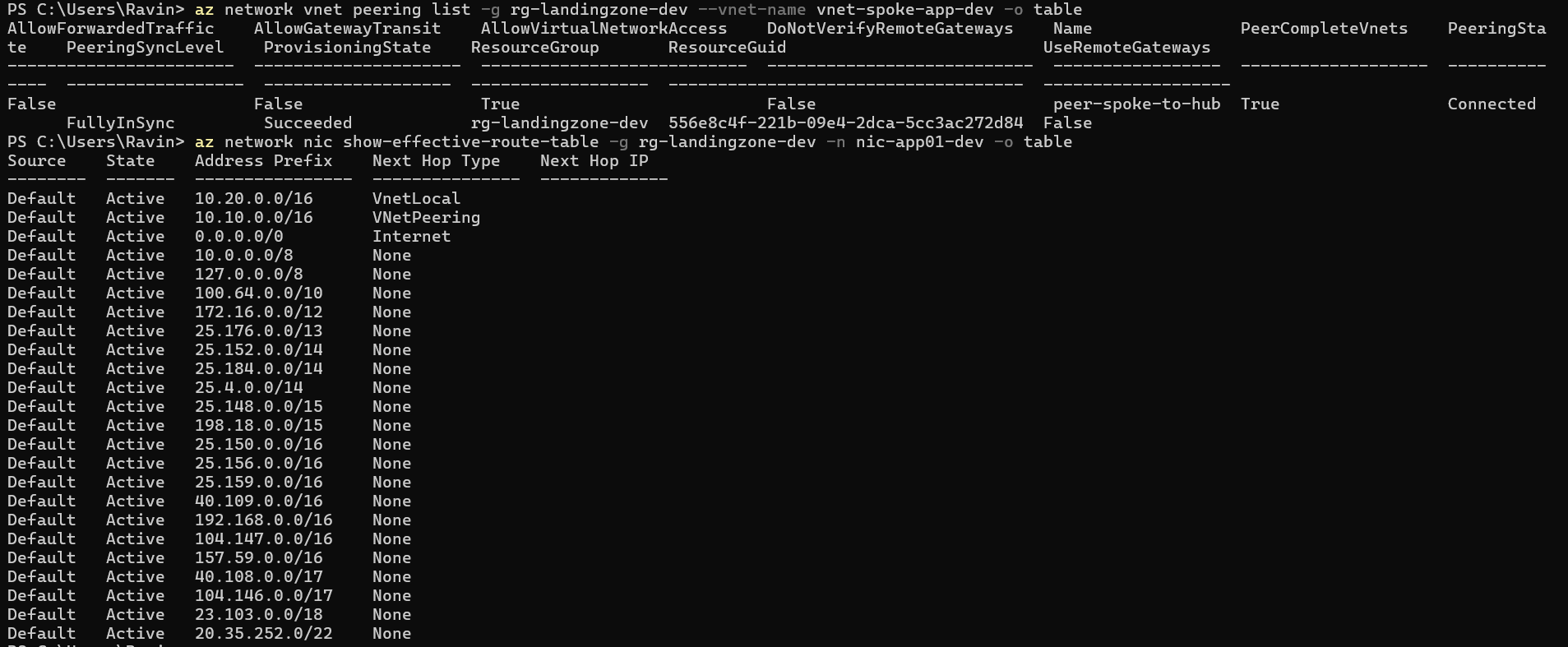
Test 2 — Bidirectional peering and route propagation verified PASS
az network vnet peering list -g rg-landingzone-dev --vnet-name vnet-hub-dev -o table
Reverse direction (peer-spoke-to-hub) also Connected, plus the spoke VM's effective route table showing an active VNetPeering route to the hub's 10.10.0.0/16 range. Worth being precise about what this proves: the peering is provisioned in both directions and the route has propagated to the NIC, so the path is routable. It is not on its own a demonstration of successful application-layer connectivity between the two VNets — NSG rules still apply on top of it, which is what Test 3 exercises.
Test 3 — Unauthorised NSG connection is blocked PASS
IP flow verify checks the packet against every NSG rule that applies to the VM's NIC and returns both the decision and the exact rule name that produced it — Access: Deny, matched against the explicit deny rule, not the default platform rule. That distinction matters: an earlier version of this test used a live connectivity probe against a port with no listener behind it, which returns "unreachable" regardless of whether the NSG or the absent service caused it. IP flow verify is a policy simulation, not a connection attempt, so a Deny result here can only mean one thing.
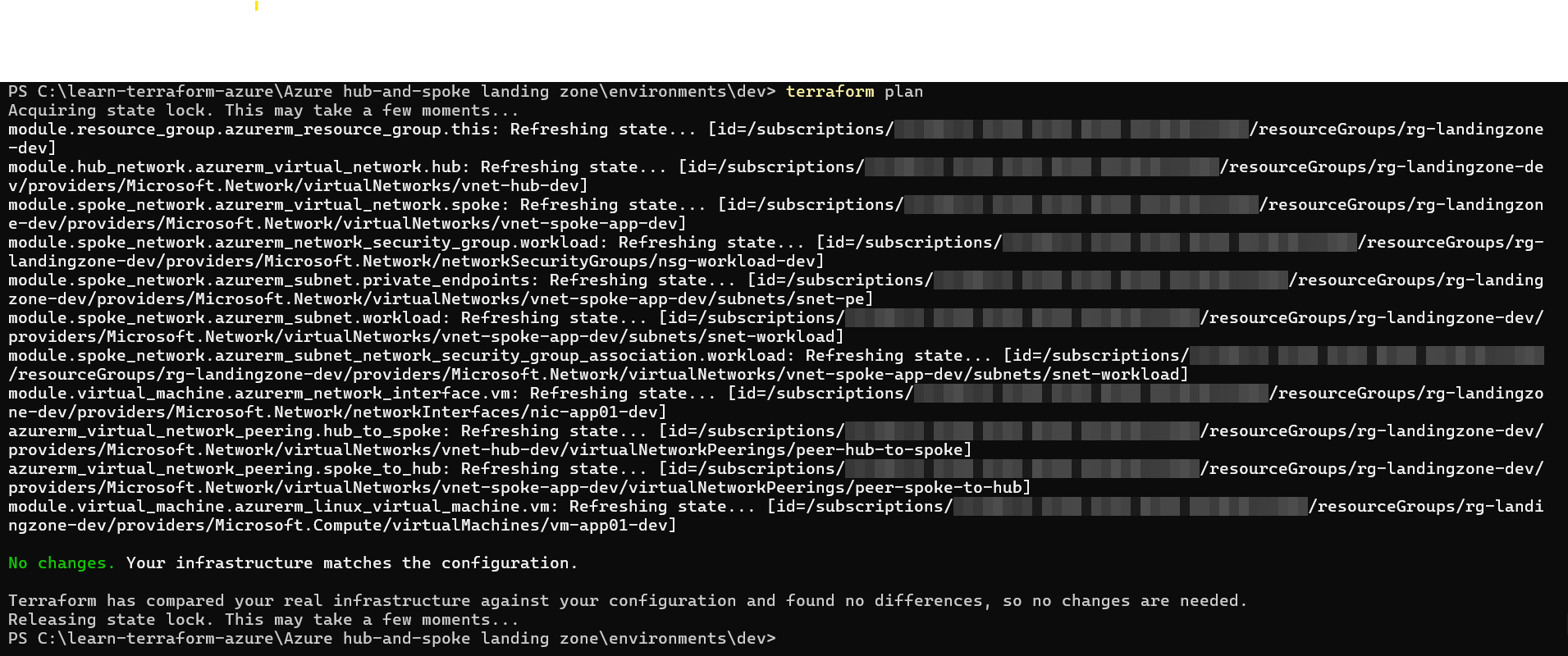
Test 4 — A second plan reports no changes PASS
terraform plan, re-run against already-applied infrastructure.
"No changes. Your infrastructure matches the configuration." — every resource refreshed cleanly with zero drift.
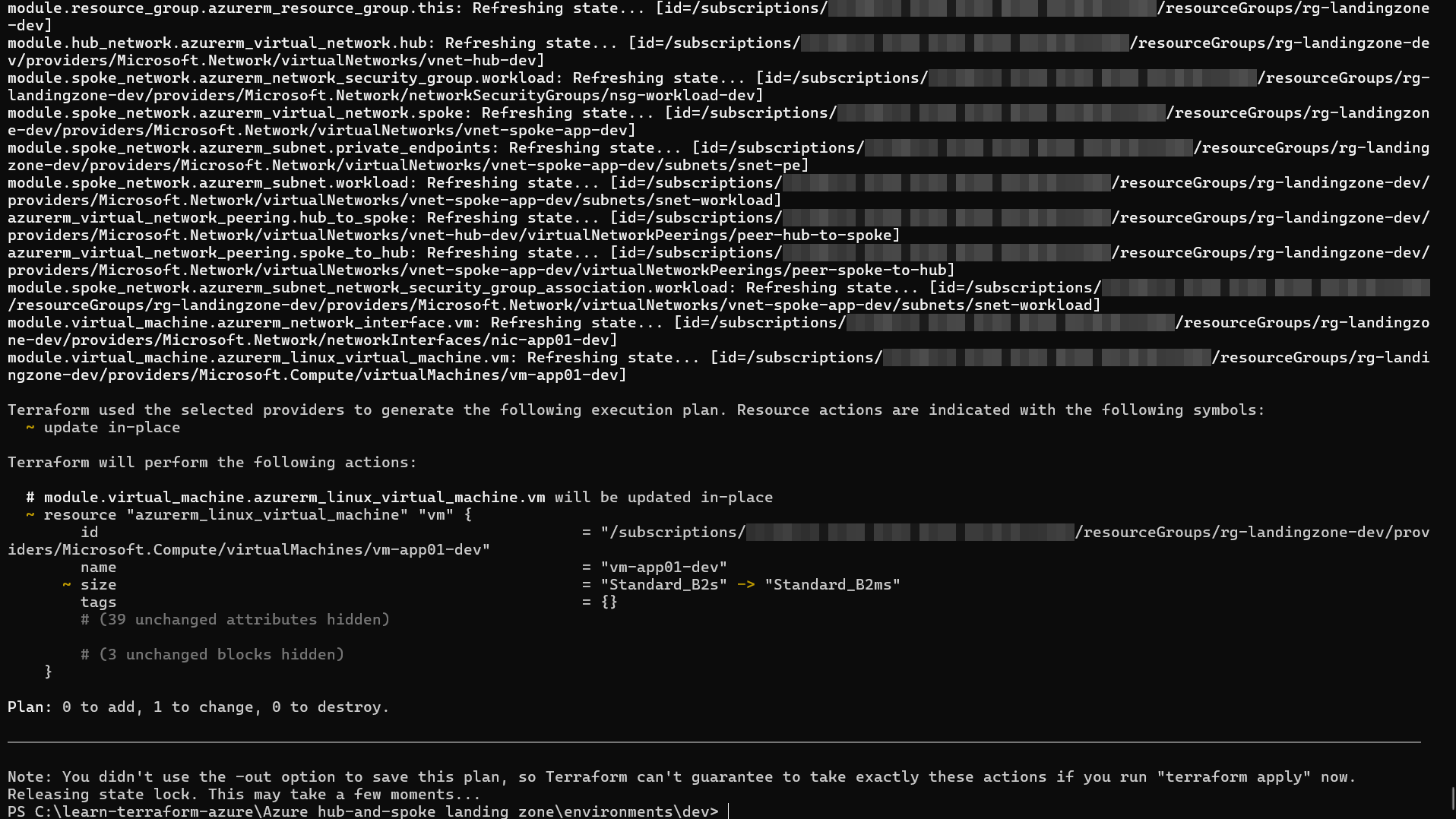
Test 5 — A variable change produces only the expected plan PASS
Overriding vm_size from Standard_B2s to Standard_B2ms in terraform.tfvars:
Exactly one resource updated in-place (Plan: 0 to add, 1 to change, 0 to destroy) — demonstrating that the variable is correctly scoped to the VM resource and that the provider supports this size change in place.
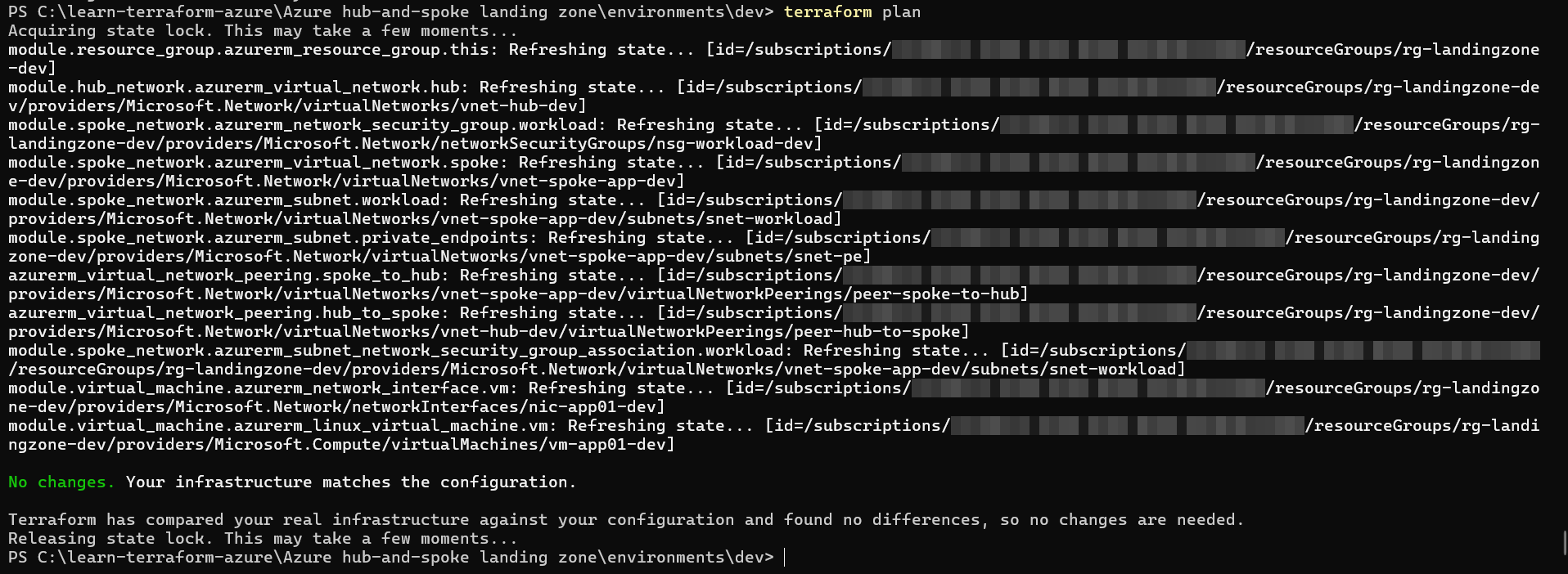
Reverting the override and re-running plan returns cleanly to "No changes" — confirming the default and the override are both stable, reproducible states.
Cost control — Bastion deployed only for testing PASS
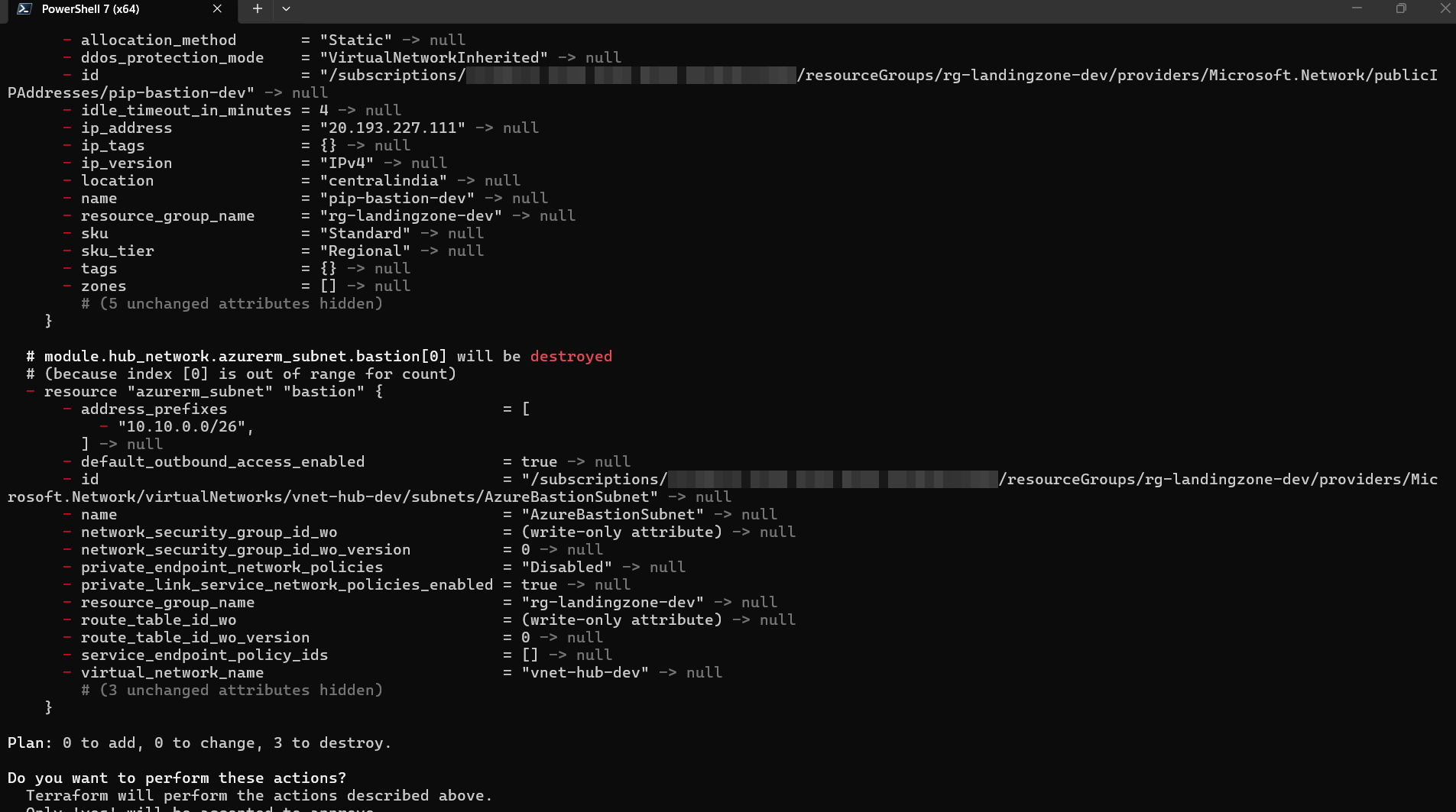
terraform apply -var="deploy_bastion=false" — Plan: 0 to add, 0 to change, 3 to destroy. Bastion, its public IP, and its subnet are removed on demand, with nothing else in the network affected.
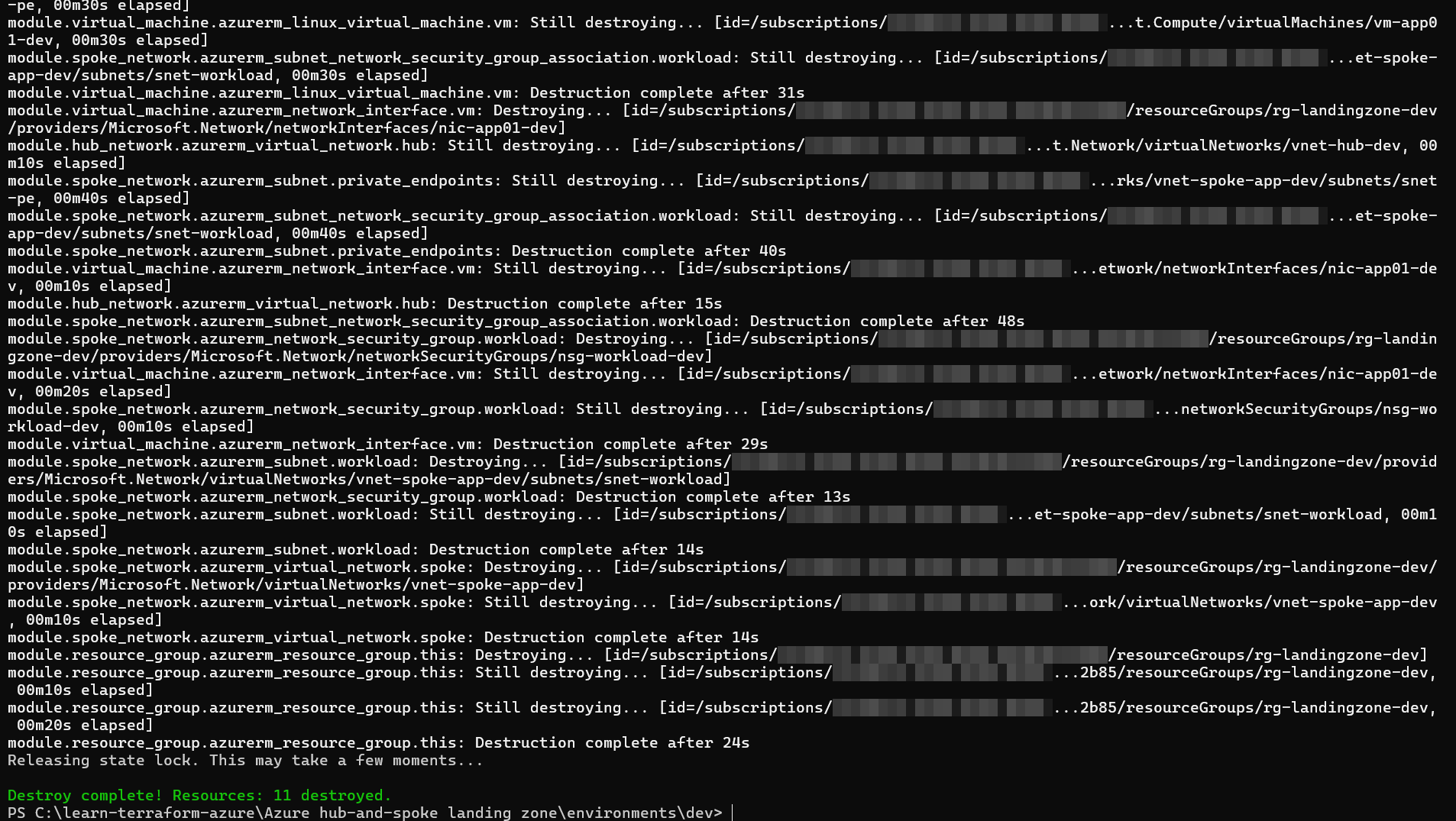
Test 6 — Clean destroy PASS
terraform destroy
Destroy complete! Resources: 11 destroyed. The workload environment was removed in dependency order with no orphaned workload resources. The separately bootstrapped remote-state storage remains intentionally in place.
Cost control and cleanup
Dedicated Azure Bastion is likely the largest time-based POC cost while deployed. The VM, managed OS disk, Bastion public IP, backend storage operations and some data transfer can also incur charges.
No Azure Firewall, no VPN Gateway — both add meaningful monthly cost and weren't necessary to prove this network design.
The B-series VM (Standard_B2s) is a burstable, low-cost SKU appropriate for a proof-of-concept workload, not a production sizing decision.
terraform destroy removes the entire environment cleanly (Test 6) — no manual portal cleanup required between sessions.
Lessons learned
A quoted variable reference is a silent, hard-to-trace bug."var.location" is valid HCL — it just means something completely different from var.location. When Azure rejects a value that looks suspiciously like your own HCL syntax, check for stray quotes before anything else.
"No public IP" is not the same as "no internet access." Azure's default outbound access means a VM can still reach the internet outbound even with zero public IP resources attached. A genuinely locked-down design needs to address this explicitly, not assume it away.
Provider major-version bumps break real code. The v4→v5 azurerm change to storage_account_id is exactly the kind of thing that breaks a snippet copied from an older tutorial — pin versions deliberately and read the provider changelog before assuming old syntax still applies.
Idempotency and scoped plans are worth testing, not just assuming. Tests 4 and 5 provide direct evidence that the applied configuration is stable and that the VM-size variable affects only its intended resource.
Explore the code
The full Terraform source, module structure, and the complete build guide referenced throughout this post are available in the repository below.
Before treating the repository as a template: remove the placeholder default from the VM SSH public-key variable, pass the validated hub CIDR variable into the hub module instead of hardcoding the address space, commit .terraform.lock.hcl, and include a sanitised terraform.tfvars.example. These are reproducibility fixes; review and test the code in your own non-production subscription before use.