A Terraform build that disables public access on a Storage Account entirely, and reaches it only through a Private Endpoint and Private DNS inside a spoke VNet.
Set public_network_access = "Disabled" and the storage account is unreachable by everything, including your own VNet. It only becomes usable again once the Private Endpoint and Private DNS are in place.
The azurerm v5 provider changed two of the resources I needed here. The private DNS VNet link now takes private_dns_zone_id instead of a name and resource group pair, and storage containers now take storage_account_id.
Everything below is checked against a live deployment: public access disabled, endpoint approved, DNS record correct, external access blocked, and a clean second plan.
No VM and no Bastion, so the whole validation costs almost nothing.
This post covers the reasoning and the evidence. If you want to build it yourself, the step-by-step build guide runs from the state backend through to teardown, with the exact commands at each step.
Why disable public access at all
A new Storage Account accepts traffic from any network the day you create it. Access is decided by identity and secrets: Entra ID role assignments, account keys, SAS tokens. Where the request came from never enters into it. That puts credentials in the position of being the only thing between the public internet and your data, so a leaked key or a SAS token scoped too widely is a straight path in from anywhere.
Disabling public network access adds the layer that's missing. The account stops accepting traffic over the public path however valid the credential is, and it's one setting to get right instead of an IP allow-list you have to keep accurate every time an office, a VPN or a build agent changes.
It doesn't make the account vanish, though. The hostname still resolves publicly and the endpoint still answers. It simply refuses, which is what the 403 in Test 4 shows. What changes is that the only usable route to the data now runs through a Private Endpoint in a specific subnet of a specific VNet.
One boundary to be clear about: this closes the data path, not the management path. Control-plane operations through Azure Resource Manager still work over the internet and are governed by Azure RBAC, not by the network. Reading the account's properties, rotating its keys, or switching this setting back on all still work from anywhere.
What actually makes this work
On its own, disabling public access leaves you with an unreachable storage account. Three more pieces have to come together before it works again over the private path:
A Private Endpoint — a network interface placed in a dedicated subnet (snet-pe), giving the storage account a private IP address inside your VNet.
A Private DNS Zone (privatelink.blob.core.windows.net) — holds the private A record, since the account's public DNS name now needs to resolve to a private IP instead.
A VNet link — connects that DNS zone to the spoke VNet, so lookups from inside the network actually use the private record.
Drop any one of the three and it breaks. Either the endpoint can't be found by name, or it exists and nothing resolves to it.
Provider gotchas hit along the way
I pinned azurerm ~>5.1 and Terraform resolved 5.5.0. Four things caught me out on the way through, and none of them fails with an obvious message the first time:
Duplicate required_providers: Terraform allows one required_providers block per module, even when your config is split across files. I had it in both versions.tf and providers.tf, and terraform init failed straight away. Keep it in one file.
azurerm_private_dns_zone_virtual_network_link schema change: this resource no longer accepts resource_group_name and private_dns_zone_name. It now takes a single private_dns_zone_id argument instead:
public_network_access_enabled is on the way out: on azurerm_storage_account it's being replaced by the string-valued public_network_access. This build uses the newer form, public_network_access = "Disabled". If you're writing against v5, use the same.
azurerm_storage_container takes an ID, not a name: if you extend this module with a container, it wants storage_account_id, not the older storage_account_name. Several storage sub-resources switched the same way in v5, so it's the first thing to check when an older snippet stops working.
Validation — five checks, all passing
Every claim above is checked against the deployed resources rather than assumed. The storage account name (stprivsbrk48) comes from a random_string suffix, so yours will differ.
Test
What it proves
Result
Public network access
Storage account rejects public network access entirely
Disabled
Private endpoint status
Endpoint connection is live and approved
Approved (Auto-Approved)
Private DNS resolution
Storage name resolves to a private IP inside snet-pe
A record → 10.20.2.4
External access blocked
A direct request from outside the VNet is denied
HTTP 403
Idempotency
A second terraform plan shows no drift
No changes
Test 1 — Public network access is disabled
Ask the CLI directly:
az storage account show `
  --name $(terraform output -raw storage_account_name) `
  --resource-group rg-private-storage-validation `
  --query "publicNetworkAccess"
"Disabled"
CLI: publicNetworkAccess returns "Disabled".
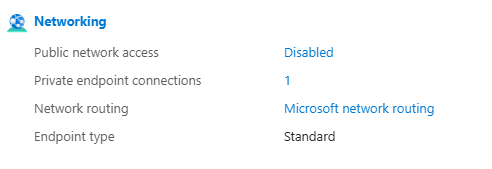
The portal's Networking blade says the same thing, and throws in a detail the CLI didn't: Private endpoint connections: 1. Network routing is Microsoft network routing, endpoint type Standard.
Portal: Public network access — Disabled, with 1 private endpoint connection.
Test 2 — Private endpoint is approved
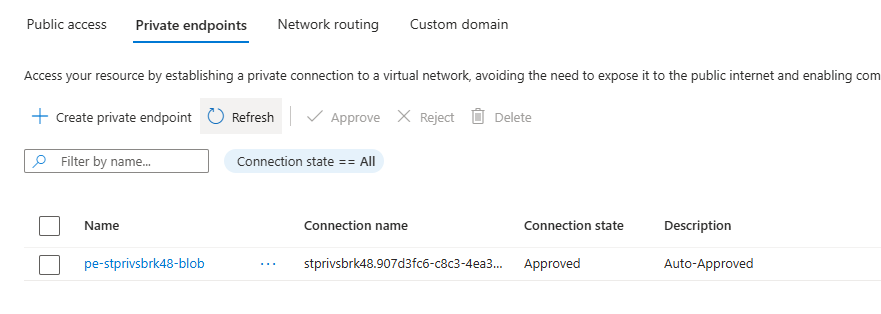
The endpoint pe-stprivsbrk48-blob shows a connection state of Approved, described as Auto-Approved. That comes from is_manual_connection = false in the Terraform. The storage account and the endpoint sit in the same subscription, so nobody has to approve it by hand.
Portal: private endpoint connection state — Approved / Auto-Approved.
Test 3 — The private DNS A record was created automatically
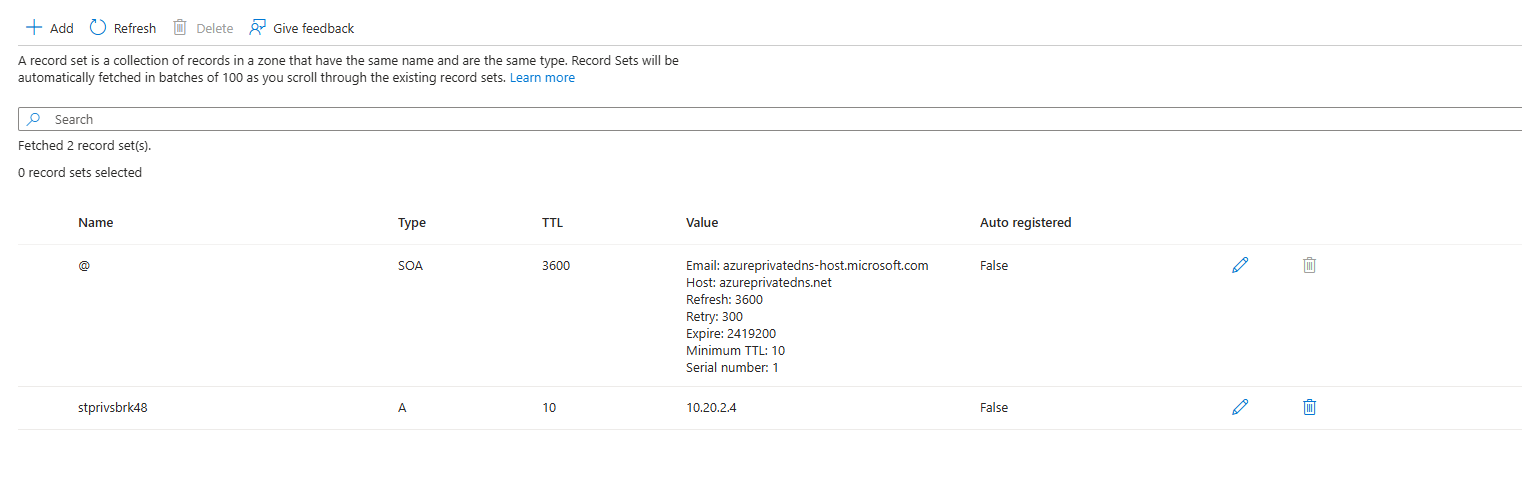
This is the one I most wanted to see. The private DNS zone privatelink.blob.core.windows.net holds an A record for stprivsbrk48 pointing at 10.20.2.4, an address inside the snet-pe range (10.20.2.0/24), exactly where the endpoint's NIC landed.
Nobody created that record by hand. The private_dns_zone_group block on the private endpoint did it. Leave that block out and you end up with a zone, a link and an endpoint that never get connected by name.
Portal: A record for the storage account resolving to 10.20.2.4, alongside the zone's default SOA record.
Test 4 — Public access is blocked from outside the VNet
A request straight from my laptop, outside the VNet. The name still resolves, the request still gets refused:
Worth being precise here. From the internet's point of view the endpoint isn't gone, it's refusing. DNS still answers and TLS still negotiates. The 403 comes back because the account no longer accepts traffic arriving over the public path.
A request from outside the VNet returns HTTP 403.
Test 5 — Idempotency
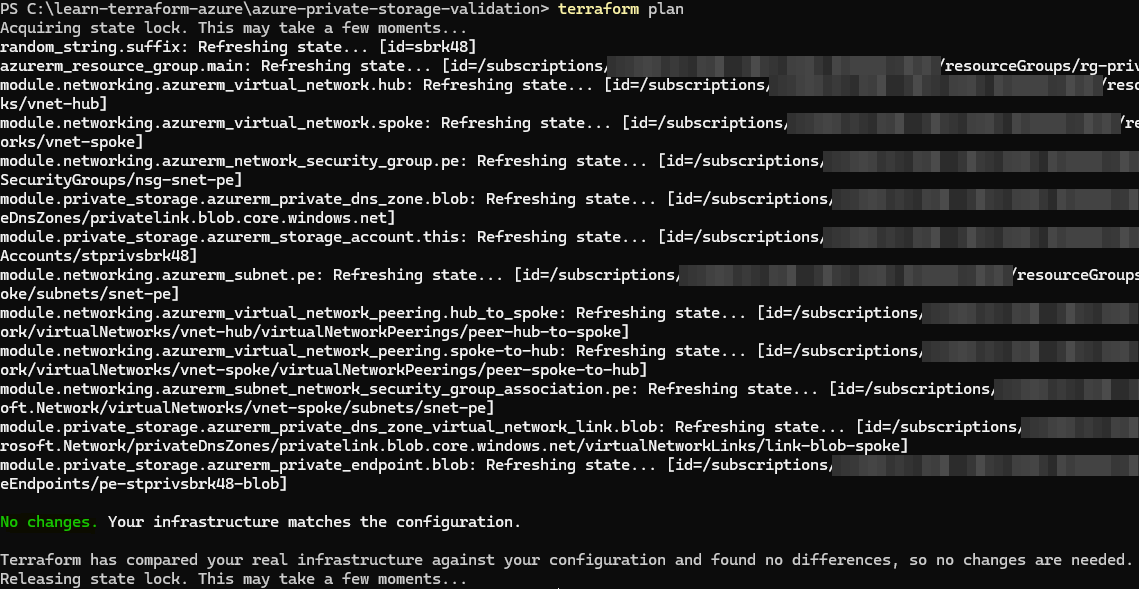
A second plan against the deployed infrastructure refreshes all 13 resources in state and finds nothing to change:
terraform plan
No changes. Your infrastructure matches the configuration.

Terraform has compared your real infrastructure against your
configuration and found no differences, so no changes are needed.
Run this even when everything looks fine. A plan that isn't clean means the config produces a different result on every run, and that's a bug, not noise.
All 13 resources refreshed; no drift detected.
Cost control
I left out the VM and Azure Bastion on purpose. Both bill by the hour just for existing, and neither is needed to prove this pattern. A trimmed hub-and-spoke network, just the subnet the private endpoint needs, plus the storage account itself, covers all five checks above. Private endpoints, private DNS zones, VNets and NSGs cost next to nothing while idle, and terraform destroy clears the lot.
The trade-off: with no VM in the spoke, I couldn't run nslookup from inside the VNet and watch the name resolve to 10.20.2.4. Test 3 proves the record exists and is correct, but confirming resolution from a client inside the network would need a temporary B-series VM. A few pence for an hour, if you want that last step.
Explore the code
The full Terraform build is on GitHub: modules, variable wiring, and the fixes for all four gotchas above. The build guide alongside it walks through the whole thing step by step, including the state backend setup and the teardown.